Enterprise-Grade FinOps Automation: Orchestrating Azure Cost Management at Scale
A technical deep-dive into a production-hardened Azure Logic App workflow for multi-granular cost reporting using Teams and Office Scripts.
As a Cloud Technologies Consultant, I frequently design solutions for high-scale organizations—such as major banks and global enterprises—where strict audit requirements and massive data volumes are the norm. In these environments, standard automation often fails due to API throttling or lack of granular visibility.
In this technical deep-dive, I’ll deconstruct a production-hardened Azure Logic App workflow I architected to automate complex, multi-granular cost reports using Teams, Office Scripts, and Excel Online.
1. The Strategy: Human-in-the-Loop Security
For strictly audited clients, hardcoding secrets is a non-starter. My workflow implements a Session-Based Security pattern:
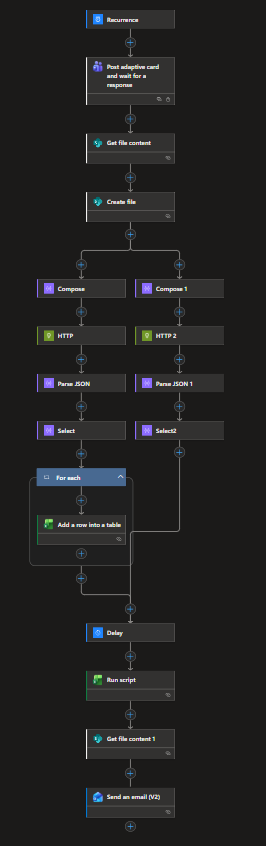
- Trigger: The process begins on the 1st of every month (Recurrence).
- Interactive Gateway: It pauses at the
Post adaptive card and wait for a responseaction. - Security Feature: I enabled Secure Inputs & Outputs on this step. The Bearer Token I provide via Teams is never logged in the clear-text history of the Logic App, satisfying compliance requirements.
2. Dynamic Template Orchestration
To ensure data integrity, we never write to a master file. We use a “Template-Instance” pattern:
- Get file content: Pulls a pre-formatted
Cost_Analysis_Report_Template.xlsxfrom a secure SharePoint library. - Create file: Generates a new instance for the current month (e.g.,
CostAnalysis_02-2026.xlsx). This provides an immutable historical record for every billing cycle.
3. Parallel Processing: The Dual-API Approach
Azure Cost Management APIs return data in different “flavors.” To maximize efficiency, I implemented Parallel Branches to fetch two different granularities simultaneously:
Branch A: High-Level Service Summary
- Granularity: Monthly
- Grouping:
ServiceName - Processing: Since this data is relatively small, a standard
For_eachloop withAdd a row into a tableis used for simplicity.
Branch B: Granular Resource Detail (The Deep Dive)
- Grouping:
ResourceIdandResourceLocation - Challenge: Large environments can have thousands of resources. A row-by-row loop here would hit Excel Online throttling limits.
- Transformation Logic: In the
Selectaction, I use advanced expressions to parse the technicalResourceIdstring:- Resource Group:
split(item()[2], '/')[4] - Resource Type:
concat(split(item()[2], '/')[6], '/', split(item()[2], '/')[7])
- Resource Group:
4. Solving the “File Lock” and Performance Bottleneck
The most critical part of this architecture is how it handles bulk data and file contention.
💡 Key Performance Insight
Standard Excel connectors are too slow for enterprise-scale data (1,500+ rows). We need a more robust engine.
- The Delay (30 Seconds): A
Waitaction between parallel branches ensures the Excel session from the Service-level loop is fully closed and the file lock is released. - The Performance Engine (Office Script): For the 1,700+ rows of resource data, I bypassed the standard connector. I pass the entire JSON array as a single string to an Office Script (TypeScript).
- Action:
Run script - Efficiency: The script performs a bulk memory-injection into Excel, reducing processing time from 20 minutes to under 15 seconds.
- Action:
5. Final Delivery and Executive Reporting
Once the Excel file is fully hydrated, the workflow moves to the final stage:
- Get file content: Retrieves the finalized, fully calculated report.
- Send an email (V2): Delivers the report to stakeholders. The email body is professionally styled with HTML/CSS, providing a summary of the insights while attaching the granular Excel report for deep-dive analysis.
 Entra acts as the central hub for identity in Azure. —
Conclusion: Consulting for Scalability
When you act as a Cloud Technologies Consultant, your job is to anticipate where “standard” solutions break. By combining Logic Apps for orchestration, Teams for secure interaction, and Office Scripts for performance, we create a FinOps engine that doesn’t just report costs—it provides a robust framework for financial accountability in the cloud.